A closer look at the new Sendo. See what changed and how to use it.
Beta V2.3
Your OTC rewards, and a more personal Sendo
Beta 2.3 brings your OTC rewards into focus, with reward baskets, individual assets and a clearer view of what you have earned. From discovering a coin to finding its community, trading and catching up with people, the whole experience feels more connected on desktop and mobile.
Your OTC rewards
Lifetime and available rewards lead the page. Open a coin’s basket to explore its reward assets and artwork, then look below for your weekly earnings breakdown.
Choose an asset to review Sell to SOL beside your rewards on desktop or in a compact sheet on your phone. For You puts Buy SENDO above a smaller rewards view in your feed.
See what each coin has paid you and what is still available. Missing history or prices stay clearly marked, and the same payout is never counted twice.
Trading and your holdings
Explore OTC Scope, open a coin’s full chart and check its market and liquidity information. Token pages also show supply, with the familiar live trades and trader dots.
Your position comes before your earnings, with Buy and Sell close by, simpler amount and cost labels, clearer reward artwork and easier-to-read dollar values.
Holdings has a place in the main menu and a rewards history line. The Sendo Reserve explains its upcoming redesign while keeping recorded holdings, buybacks and wallet links accessible.
Communities and your everyday Sendo
Find Your Community becomes a compact artwork gallery with fitted banners. Open a community for member faces, recent posts and eight stats: market cap, volume, liquidity, price change, holders, Sendo buybacks, holder payouts and supply. Search, filters, Add community and a clear Visit community button stay within reach.
For You brings trending communities into a swipeable story-style row, with compact previews and a Following feed. Notifications, messages, profiles and settings get a refresh; follower and following counts open their lists.
OTC Rewards leads the menu, with Holdings directly below Find Your Community. Custom Sendo icons, the OTC computer, your profile picture and a redesigned bell carry through desktop and mobile. Launch on OTC sits under More.
Beta V2.2.4
Newer launch transactions verify again
Coins launched with the newest transaction format can be found and minted again.
Fixes
Mint a community works for OTC coins launched with the newest transaction format.
Reward history reads those transactions too.
Beta V2.2.3
Find us on X, and clearer OTC wording
The footer now links to Send.Do on X, OTC links go to OTC’s active account, and every “What is Send.Do” answer says the same thing: a social trading app powered by OTC.
Links and wording
Every page’s footer links to @sendomedia on X.
The OTC community and OTC updates link to @otcdotcash, OTC’s active account.
What is Send.Do, the FAQ and the Learn guide now open the same way: a social trading app powered by OTC; coins launch on OTC Desks and their communities trade here. The Beta V2.1 notes now say automatic SENDO buys are paused.
Fixes
The version pill stays in the corner while you scroll.
Beta V2.2.2
Small buys with a small balance
A buy now only keeps back what it really needs for network fees, so about a dollar of SOL is enough for a small buy.
Trading
Short on SOL? The button shows how much to add, and Add funds says why: network fees, plus a token account the first time you buy a coin.
Beta V2.2.1
Convert from Ethereum and Base without a browser wallet
Convert gives you an address to send ETH, ETH on Base or USDC on Base from any wallet or exchange, and SOL arrives in your wallet.
Money in and out
Pick Ethereum or Base in Convert, add your own refund address, then send the exact amount shown to the address or QR code.
Have an Ethereum wallet in this browser? You can still use it instead, and if it does not connect you keep the address.
Beta V2.2
Your position, your rewards and your cash
See how you are doing on every coin, and move money in and out from your balance at the top right. Coin pages lead with market cap and what the coin pays holders, with a chart you can zoom out to older history. OTC Scope is a new way to find OTC coins.
Money in and out
Tap your balance at the top right for Add funds, Withdraw and Receive. Add funds with a card or Apple Pay straight to your Send.Do wallet, by scanning a QR code, or from Phantom.
Withdraw has a Max button that keeps a little SOL for network fees. Paste an address or scan a QR code.
Convert, in the same menu, turns Bitcoin, Ethereum, Base and other Solana tokens into SOL. Solana tokens convert with no Send.Do fee, and other chains come over through RAVN.
Trading
Your position sits beside the trade card on every coin and its community: what you hold, your average buy as a market cap, and your profit or loss in one plain sentence.
Your rewards lists what each coin has paid you, what you still hold, and a Sell to SOL button with no Send.Do fee.
Coin pages show how much the Sendo Reserve holds. Zoom out or drag the chart back to load older history, and trader bubbles show who is buying and selling on Send.Do.
OTC Scope and communities
OTC Scope has New, Hot and Established lanes, each coin with a mini chart, what it pays holders, how much the Sendo Reserve holds and a one-tap Buy. Filter, save presets, or switch to the table view.
Mint a community for your OTC coin by burning SENDO. Every burn is checked on chain before the community is minted.
On phones, community pages open faster, and the Trade sheet shows a 24h chart with an Open chart button.
Beta V2.1.3
Bought on Sendo is back
Community pages show recent Send.Do purchases again, and comment likes work.
Communities
The Bought on Sendo panel on community pages lists recent purchases again.
You can like comments on community posts.
Beta V2.1.2
Prices back
Dollar values are back after a price source stopped answering for SOL, and your balance holds steady while it refreshes.
Prices and balances
Dollar values for SOL show again across the site.
Your SOL balance keeps its last reading while it refreshes.
Beta V2.1.1
Coin pictures stay up
Coin logos now load from Send.Do itself, so they keep showing even when another site is down.
Beta V2.1
SENDO buy-and-burn is built, and Send.Do is easier to find
Trading fees are set up to buy SENDO and burn it, and to buy community coins for the Reserve to keep; automatic buys are paused for now. The site loads faster, works better on phones and has a new Learn section. OTC rewards are available on the OTC Rewards page.
SENDO and the Reserve
0.3% of every trade is set aside to buy SENDO and burn it. The first burn, from one owner-funded run, removed 1,493,470 SENDO, with receipts on Supply & burns.
Another 0.3% is set aside to buy the traded coin for the Reserve to keep. OTC rewards are available on the OTC Rewards page. Sendo Circle is not active.
Find your way around
A new Learn section: what Send.Do is, how buy-and-burn works, how to spot bundled and copycat coins, and a live Reserve report.
A simpler sidebar, with the main pages up front and the rest under More. Search shows communities and people first.
Terms, Privacy and Risk pages open without signing in.
Faster and smoother
Pages load faster and show their content right away, which also helps people find Send.Do on Google.
On phones: bigger buttons, no zooming into forms, and a Trade button that stays in reach on coin pages.
Coin launching is gone. New coins arrive through OTC launches.
From a post to a trade
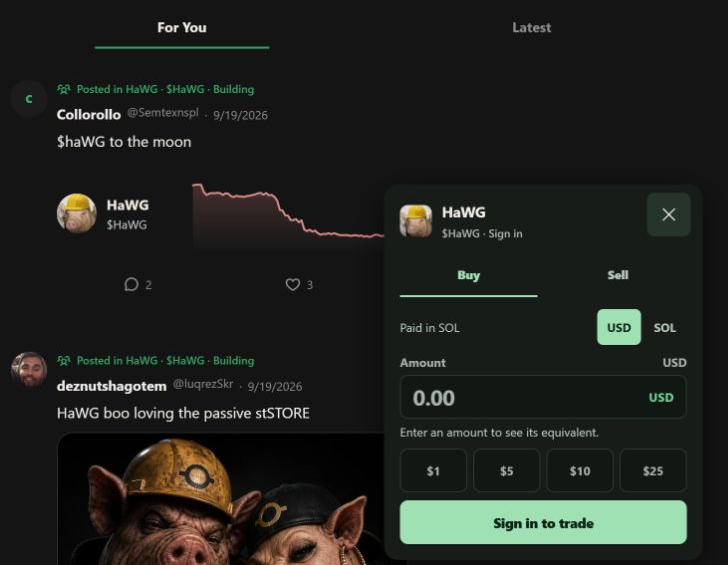
Open Trade beside a coin. Your conversation stays in place.
View full size Actual V2 preview · September 29, 2026 · Figures are a snapshot, not live data.
Step 1 of 3: Open Trade. Find a coin under a community post. Trade opens beside it on desktop, or at the bottom on your phone.
Discover coins through their communities, trade beside the conversation, and return to the coins you follow. Picture guides walk through the new controls, with a timeline for older releases. SENDO, Reserve and Circle pages are available in V2; reward previews do not activate financial automation, which has not started yet.
View full release notes
Conversations and trading
Posts bring together community conversations, shaded price charts, market cap and Watch/Trade controls. Your coins opens a compact catch-up with community artwork, author profiles and recent posts; watches and reading progress stay on this device.
Purchase forms across the feed, communities and token pages offer USD/SOL entry, show the estimated equivalent and say Paid in SOL. Review the quote and fees before confirming; nothing is posted or joined automatically. The 1% app fee now shows its split: 0.3% set aside to buy and burn SENDO, 0.3% set aside to buy the traded coin, 0.2% company and 0.2% Jupiter.
In focus explains why a community is featured and shows up to four latest posts. A compact strip below each community banner brings rewards, Reserve context and recent buys together, with details that open in place. Charts and trading stay on the normal page scroll.
Your communities and account
Find the communities in your Collection and follow their conversations. Search bookmarks by community, check activity and manage Account, Security and Wallets in Settings.
Like posts and replies, take part in community polls, and crop your avatar or banner before saving. Phone navigation has larger touch targets and clearer layouts.
The changelog now has real picture guides and a clickable, swipeable release timeline. Search older notes without leaving the page.
SENDO and the Reserve
SENDO has its own home, linked to its community, the Reserve and Sendo Circle. Reserve wallets explains each wallet role; Sendo OTC Burns explains the Seed split separately from OTC’s own rewards, with burn history still pending.
Supply & burns separates community-mint receipts from buy-and-burn. The roughly $6 community-mint burn stays locked for launch verification; unavailable supply is not shown as zero.
My Rewards and Sendo Circle remain previews. First-fee history safeguards are installed; Seed setup now checks its actual funding receipt. Purchases, burns and payouts have not started: nothing has been bought or burned, and no SENDO holder has been paid yet. Entering a token address does not start them. Preview choices do not save live preferences.
The story so far.
Pick a release. See what changed.
Older notes describe the product at that time, not what is active today.
Beta V2.2.4Beta
Newer launch transactions verify again
Coins launched with the newest transaction format can be found and minted again.
Fixes
Mint a community works for OTC coins launched with the newest transaction format.
Reward history reads those transactions too.
Beta V2.2.3Beta
Find us on X, and clearer OTC wording
The footer now links to Send.Do on X, OTC links go to OTC’s active account, and every “What is Send.Do” answer says the same thing: a social trading app powered by OTC.
Links and wording
Every page’s footer links to @sendomedia on X.
The OTC community and OTC updates link to @otcdotcash, OTC’s active account.
What is Send.Do, the FAQ and the Learn guide now open the same way: a social trading app powered by OTC; coins launch on OTC Desks and their communities trade here. The Beta V2.1 notes now say automatic SENDO buys are paused.
Fixes
The version pill stays in the corner while you scroll.
Beta V2.2.2Beta
Small buys with a small balance
A buy now only keeps back what it really needs for network fees, so about a dollar of SOL is enough for a small buy.
Trading
Short on SOL? The button shows how much to add, and Add funds says why: network fees, plus a token account the first time you buy a coin.
Beta V2.2.1Beta
Convert from Ethereum and Base without a browser wallet
Convert gives you an address to send ETH, ETH on Base or USDC on Base from any wallet or exchange, and SOL arrives in your wallet.
Money in and out
Pick Ethereum or Base in Convert, add your own refund address, then send the exact amount shown to the address or QR code.
Have an Ethereum wallet in this browser? You can still use it instead, and if it does not connect you keep the address.
Beta V2.2Beta
Your position, your rewards and your cash
See how you are doing on every coin, and move money in and out from your balance at the top right. Coin pages lead with market cap and what the coin pays holders, with a chart you can zoom out to older history. OTC Scope is a new way to find OTC coins.
Money in and out
Tap your balance at the top right for Add funds, Withdraw and Receive. Add funds with a card or Apple Pay straight to your Send.Do wallet, by scanning a QR code, or from Phantom.
Withdraw has a Max button that keeps a little SOL for network fees. Paste an address or scan a QR code.
Convert, in the same menu, turns Bitcoin, Ethereum, Base and other Solana tokens into SOL. Solana tokens convert with no Send.Do fee, and other chains come over through RAVN.
Trading
Your position sits beside the trade card on every coin and its community: what you hold, your average buy as a market cap, and your profit or loss in one plain sentence.
Your rewards lists what each coin has paid you, what you still hold, and a Sell to SOL button with no Send.Do fee.
Coin pages show how much the Sendo Reserve holds. Zoom out or drag the chart back to load older history, and trader bubbles show who is buying and selling on Send.Do.
OTC Scope and communities
OTC Scope has New, Hot and Established lanes, each coin with a mini chart, what it pays holders, how much the Sendo Reserve holds and a one-tap Buy. Filter, save presets, or switch to the table view.
Mint a community for your OTC coin by burning SENDO. Every burn is checked on chain before the community is minted.
On phones, community pages open faster, and the Trade sheet shows a 24h chart with an Open chart button.
Beta V2.1.3Beta
Bought on Sendo is back
Community pages show recent Send.Do purchases again, and comment likes work.
Communities
The Bought on Sendo panel on community pages lists recent purchases again.
You can like comments on community posts.
Beta V2.1.2Beta
Prices back
Dollar values are back after a price source stopped answering for SOL, and your balance holds steady while it refreshes.
Prices and balances
Dollar values for SOL show again across the site.
Your SOL balance keeps its last reading while it refreshes.
Beta V2.1.1Beta
Coin pictures stay up
Coin logos now load from Send.Do itself, so they keep showing even when another site is down.
Beta V2.1Beta
SENDO buy-and-burn is built, and Send.Do is easier to find
Trading fees are set up to buy SENDO and burn it, and to buy community coins for the Reserve to keep; automatic buys are paused for now. The site loads faster, works better on phones and has a new Learn section. OTC rewards are available on the OTC Rewards page.
SENDO and the Reserve
0.3% of every trade is set aside to buy SENDO and burn it. The first burn, from one owner-funded run, removed 1,493,470 SENDO, with receipts on Supply & burns.
Another 0.3% is set aside to buy the traded coin for the Reserve to keep. OTC rewards are available on the OTC Rewards page. Sendo Circle is not active.
Find your way around
A new Learn section: what Send.Do is, how buy-and-burn works, how to spot bundled and copycat coins, and a live Reserve report.
A simpler sidebar, with the main pages up front and the rest under More. Search shows communities and people first.
Terms, Privacy and Risk pages open without signing in.
Faster and smoother
Pages load faster and show their content right away, which also helps people find Send.Do on Google.
On phones: bigger buttons, no zooming into forms, and a Trade button that stays in reach on coin pages.
Coin launching is gone. New coins arrive through OTC launches.
Beta V2Beta
A fresh Send.Do, built around conversations
Discover coins through their communities, trade beside the conversation, and return to the coins you follow. Picture guides walk through the new controls, with a timeline for older releases. SENDO, Reserve and Circle pages are available in V2; reward previews do not activate financial automation, which has not started yet.
Conversations and trading
Posts bring together community conversations, shaded price charts, market cap and Watch/Trade controls. Your coins opens a compact catch-up with community artwork, author profiles and recent posts; watches and reading progress stay on this device.
Purchase forms across the feed, communities and token pages offer USD/SOL entry, show the estimated equivalent and say Paid in SOL. Review the quote and fees before confirming; nothing is posted or joined automatically. The 1% app fee now shows its split: 0.3% set aside to buy and burn SENDO, 0.3% set aside to buy the traded coin, 0.2% company and 0.2% Jupiter.
In focus explains why a community is featured and shows up to four latest posts. A compact strip below each community banner brings rewards, Reserve context and recent buys together, with details that open in place. Charts and trading stay on the normal page scroll.
Your communities and account
Find the communities in your Collection and follow their conversations. Search bookmarks by community, check activity and manage Account, Security and Wallets in Settings.
Like posts and replies, take part in community polls, and crop your avatar or banner before saving. Phone navigation has larger touch targets and clearer layouts.
The changelog now has real picture guides and a clickable, swipeable release timeline. Search older notes without leaving the page.
SENDO and the Reserve
SENDO has its own home, linked to its community, the Reserve and Sendo Circle. Reserve wallets explains each wallet role; Sendo OTC Burns explains the Seed split separately from OTC’s own rewards, with burn history still pending.
Supply & burns separates community-mint receipts from buy-and-burn. The roughly $6 community-mint burn stays locked for launch verification; unavailable supply is not shown as zero.
My Rewards and Sendo Circle remain previews. First-fee history safeguards are installed; Seed setup now checks its actual funding receipt. Purchases, burns and payouts have not started: nothing has been bought or burned, and no SENDO holder has been paid yet. Entering a token address does not start them. Preview choices do not save live preferences.
Create an account with email, join communities, and take part in conversations before connecting a wallet. Community X adds a focused place for important public posts, with clear community signals and a direct path back to X.
Create free, mint after launch
Start a community now. Minting opens after SENDO launches.
Create a community for free from Add Community. The mint option has a shaded lock until SENDO launches; you can upgrade the same community later.
Free communities appear in New, All, Active, Taking Off, search and Latest. Minting will add For You eligibility, claim applications, a silver tab, green avatar frame and animated banner sheen, not guaranteed recommendations, ownership or verification.
The silver Minted on Sendo badges on community cards are 50% smaller, leaving more room for the artwork and name. Our ten founding communities keep their free upgrades and existing managers.
Clearer markets and rewards
OTC Markets shows FDV instead of volume, alongside market cap. FDV means fully diluted valuation; unavailable values stay blank rather than borrowing market cap.
The OTC community shows OTC’s ecosystem-wide rewards summary, with its snapshot time and a link to OTC Rewards. Other communities keep their own lifetime payouts in the tokens holders receive. Temporarily missing rewards now recover sooner.
Moving right now shows the highest FDV coins with fresh data, not volume. Personalized recommendations are unchanged. Lifetime reward tracking also covers newly listed communities as the site grows.
Easier conversations and bug fixes
Join, post, reply and like with your email account. No wallet popups. Connect a wallet when you trade; your entered amount is kept. Existing posts and memberships stay with your account.
Community X brings shared X posts into each community, with Hot and New sorting, Fire reactions and a link to the original post. Fixed posts changing to the wrong community, repeated reaction clicks and suspended members bypassing restrictions.
Likes respond immediately and recover from failed saves. Notifications open the right conversation, names load on longer feeds, and views count after one second of visibility rather than quick refreshes. Repeat visits can count again after 30 minutes.
Find communities and conversations that fit your interests, or switch to Latest for posts in time order. Claimed communities can bring an X group into the right room with one invite, while cleaner community pages, notifications, My Desk, and trading screens work across phones and computers.
Communities and posts
Featured communities show up to four recent posts, including small photo previews. The feed and community list no longer briefly show the wrong community while loading. Community voting has been removed, and FYC now appears above OTC Markets.
Owners and admins can add a community introduction. Owners, admins, and moderators can pin posts. Community bios, member photos, and manager details remain visible on phones.
Claimed communities can share an X Group invite. New members finish the normal secure signup and return to that exact community; completed joins count once. Media tabs now use the simpler Media label. Approved claims from the earlier claim system stay attached to the same account.
Markets and My Desk
Moving right now ranks coins by recent trading volume, not by the biggest price change. Cards show market cap.
My Desk shows supported OTC desks held by your linked wallets. Desk owners get a small profile badge; it does not grant community admin or verification status. Use OTC to manage the desk. Settings now lets you link another Phantom or Solflare wallet without replacing existing wallets.
Every listed coin builds an exact lifetime total of the reward tokens paid to holders. New listed coins start tracking automatically, and partial backfills are never shown as lifetime totals. Pages also show live bonding progress or a Bonded badge. Trading pages use less empty space, with recent trades closer to the chart and community posts below that coin’s fees.
Your feed and notifications
Sendo learns what you care about and helps you find communities worth paying attention to.
Latest shows posts in time order. Load more without repeats, refresh when you want new posts, and use Feed settings to turn personalization off, reset interests, or unmute communities.
Repeated likes are grouped with names and profile pictures. A Replies filter, smaller gaps, and custom Send.Do icons make alerts easier to read. Wallet and security alerts remain separate.
Communities can show who manages them without changing that person’s username. Follow-up fixes improve joining, wallet switching, photo uploads, and saving community details. Buy and sell trades have the 1% app fee; sending SOL has only the Solana network fee.
Community management
Signed-in users can request to manage any listed community without pasting a wallet address, signing a message, or sharing a private key. Claims accept photos while the page loads, keep your username, and preserve the original launcher’s record. Approved claims show Official or Represented by.
Owners, moderators, and approved operators can edit the bio, rules, links, and team roles. Settings show usernames and profile photos with one Save changes button. The approved bio replaces the DexScreener description on both the community and token pages.
Joining works on every listed community. The button stays on Joined without an extra popup. Community permissions do not give them access to members’ funds.
Wallets and trading
After using Phantom, choosing Send.Do switches back to the account’s existing wallet. Accounts without a Send.Do wallet see a signup card instead of an error.
Phantom buys and sells include the disclosed 1% Send.Do app fee. Send SOL charges only the Solana network fee. Before sending, Send.Do checks the recipient, amount, and SOL transfers against what you reviewed and rejects an unexpected extra SOL transfer.
Signing out or changing your password ends other open sessions for the account.
Photos, links, and page loading
Large claim photos and banner uploads are resized to fit. Community banners stay saved for everyone, and the banner editor opens above the page instead of behind it.
Website and X links can be saved without typing https://. Saved links appear on the community banner; invalid links show Incorrect link instead of a generic error.
Phone headers place Join and the reward token below the community photo. Home, For You, and Markets show useful content sooner, with less empty space between community cards. OTC Markets keeps its coin list, reward-token images, and SENDO chart link.
Browse more OTC coins and open their charts from one market list. Buying, selling, and switching wallets work with more listed communities, while posts keep your Send.Do name.
OTC Markets
The market list shows reward-token images, trading venues, and chart shortcuts. A second venue appears only when it has liquidity.
Added the SENDO chart shortcut and a link to OTC’s SPL-404 launcher. Coins with several reward tokens show each token’s image.
Added community pages for OTC’s top twenty coins by market cap. Listing a community does not automatically verify it.
Trading and wallets
Buy and sell estimates now support listed SOL-paired coins such as Lucia, not just verified communities. Failed estimates show an error instead of loading forever.
Phantom buys and sells include the 1% Send.Do app fee; Send SOL uses only the Solana network fee. Confirmed trades contribute to that coin’s fee total.
Switch between Phantom and your Send.Do wallet more reliably. Holdings follow the selected wallet, while your profile name stays the same.
Posts and artwork
Post views also count in listed communities such as Lucia. Known accounts show their name and picture instead of a wallet address.
Community cards use the coin’s DexScreener banner when available, or its token image when there is no banner.
The Buy panel and Send SOL screen now match Send.Do’s updated design. This update also fixes wallet reconnects, member pictures, and missing price displays.
Trading
Redesigned the Buy panel and simplified its text without removing the app fee breakdown. Signing in and linking a wallet are still required to trade.
If a price update is delayed, the last available price stays visible for a short time instead of disappearing.
Wallets and communities
Send SOL uses the same design as the Buy panel. Phantom reconnects as Phantom rather than being mistaken for a Send.Do wallet.
Member pictures come from the profile linked to each wallet. New accounts use the computer avatar until they upload a picture.
Lucia’s community card now shows its TTWO reward token.
Beta V1.3Beta
Lucia joins and Send SOL works again
Lucia joined the community list after winning the vote. Send SOL can reconnect your existing Send.Do wallet instead of leaving the transfer button disabled.
Communities
Lucia is now a listed community. Winning the vote did not give it a verified badge.
Its community page opens normally instead of saying it is not listed.
Wallets
Send SOL reconnects the wallet already linked to your account when needed.
A slow wallet connection offers Retry or Reconnect instead of staying locked.
Beta V1.2Beta
Easier to use on a phone
Community, trading, and login screens make better use of a small screen. Bottom navigation makes the main pages easier to reach.
Phone layout
Community pages keep Buy, Sell, and Open chart easy to find. Long bios start collapsed, and opening a post skips the large banner.
Trading pages show the chart first and place extra links under More.
Bottom navigation includes For You, Communities, Search, and Profile.
Accounts
The login screen has a clear Sign up button beside the email-code option.
Beta V1.2Beta
Replies, photo posts, and conversations
Open a post to read its conversation and reply directly to other replies. Photo posts and community trading are easier to use without switching pages.
Posts and replies
Clicking a post opens its conversation. You can reply to a reply, with a layout that stays readable on phones.
The writing box expands as you type. Like, reply, and bookmark buttons are larger and more evenly spaced.
View counts use a compact number display.
Photos
Paste, drop, or select a photo to add it to a post. Images keep their original proportions.
Open a photo at a larger size and like, save, or reply from that view.
Communities
For You and community pages show the same posts and conversations.
Community pages keep buying and selling near the posts, with the chart below.
Beta V1.1Beta
Post views and coin-specific fees
Post views are more reliable, and Nasduck and Own this Cat joined as verified communities. Fee totals show the trades for the selected coin.
Posts and communities
Each viewer counts once per post per day, consistently across feeds.
Added verified Nasduck and Own this Cat communities with their artwork and posting enabled.
Trading and fees
Fee totals use confirmed Jupiter V2 trades for that coin, without adding older estimates.
Prepared trading support for OTC, SENDO, Nasduck, and Own this Cat.
New-token trade funding and automatic SENDO buybacks were not active in this release.
Beta V1.0Beta
Send.Do Beta
The first beta brings communities, profiles, and trading together. Wallet totals and trade confirmations make it easier to see what you own and what happened after a trade.
Trading and wallets
Connect Phantom or Solflare, or choose an available Send.Do beta wallet. Enter buys in dollars and see position values and recorded profit or loss.
Wallet totals include SOL and tokens with available prices. Missing prices are labeled rather than treated as zero.
Trading pages show market trades alongside confirmed Send.Do trades. Community cards and holdings update their prices automatically.
Profiles and posts
Profiles combine coin cards, posts, recent trades, OTC launches, and joined communities. You can edit your bio.
Posts and replies show your account name and picture. Likes and bookmarks stay consistent between feeds, and replies have clearer blue outlines.
Profile verification badges are only added to accounts approved by Send.Do.
Fees
The 1% app fee allocates 0.2% of the trade to Jupiter, 0.6% to SENDO buyback funding, and 0.2% to company operations. Pool and network fees are additional.
Automatic payouts and SENDO buybacks were on hold in this release. A recorded fee allocation did not mean money had already reached its destination.
v0.1.0-alpha.1Private preview
Preparing accounts and trading
This testing release introduced email login codes and improved wallets, profiles, and trade confirmations. Follow-up changes on September 12 added dollar amounts, clearer positions, and the 1% fee breakdown.
Accounts and profiles
Added branded email codes, resend controls, profile bios, and clearer profile-photo saving. Profile pictures support up to 2 MB and banners up to 5 MB.
Profiles show coin cards, posts, recent trades, OTC launch history, and communities without creator reputation scores. Social actions use your account login instead of repeated wallet prompts.
Added branded images when sharing Send.Do and community links.
Wallets and trading
Added deposit addresses and QR codes, reviewed SOL transfers, wallet export controls, and in-app wallets for testing.
Improved pending and confirmed trade messages, removed duplicate success popups, and connected confirmed trades to profile history without guessing missing purchase prices.
Added dollar Buy amounts, dollar wallet totals, position profit or loss, and a market-cap-first chart with matching market figures. Missing prices remain labeled.
Fees
Set the app fee to 1%: 0.2% for Jupiter, 0.6% for SENDO buyback funding, and 0.2% for company operations. Pool and network fees are additional.
Preserved older fee records and separated recorded allocations from completed payouts. Automatic payouts and buybacks remained on hold.
v0.1.0-alpha.0Private alpha
The new Send.Do design
The first private alpha rebuilt Send.Do around community posts, coin discovery, and trading. It introduced the pixel-S logo and the visual style used across the new pages.
Communities and posts
Added community feeds, photo posts, member counts and pictures, direct messages, and bookmarks. For You and Search became the main discovery pages.
Added owner-selected verified communities and a voting system with vote confirmation. OTC, Nasduck, and Own this Cat led the community previews.
Prepared post view counts and feed ranking based on recency, activity, and community variety. Sample posts were used in previews.
Markets
Rebuilt token pages with charts, rewards, trades, holder maps, and buying near the chart. Added clearer reward-token images and an optional wallet-arrival alert with sound off by default.
OTC became the first verified community, with its own rewards, buyback, burn, and desk activity figures. Reward totals included current dollar estimates.
Added community wallet and balance-share figures. Trading and fee displays were prepared for testing; automatic buybacks were not active.
Profiles
Added editing for profile pictures, banners, names, and usernames, plus small charts on OTC holding cards.
Following and Followers lists open profiles. Launch history is limited to supported OTC coins, and personal verification badges are not automatic.
Added safeguards for voting and image uploads while continuing reliability and security testing.
v0.12.0Earlier release
Launch tools, communities, and fees
This earlier Send.Do release expanded launch protections and added multi-wallet accounts. It also updated communities, creator fee claims, and token data.
Launch protections
Expanded checks for coordinated launch buying across tokens and longer time periods. Added a public blocked-wallet list, downloads, and an appeal form.
Added checks for new token images that closely copy an existing token.
Wallets and communities
Added multiple labeled wallets per account, public or private wallet visibility, and creator-wallet visibility on their launched tokens.
Community cards show banners and recent trade activity. Community headers show member pictures; owners and moderators can review removed posts.
Creators can select a wallet and claim available token fees with one signature.
Fees and market data
Added fee-model choices, including Buyback & Burn and Deep Liquidity, and a fees explanation page. Fee features were labeled beta.
Send.Do supplied recent trades, holders, token details, and charts directly. Restored graduated-token prices and increased the holder-list limit to 50,000.
Scheduled fee distribution every 20 minutes with varied timing. This describes the earlier release, not the current beta payout status.
v0.11.0Earlier release
Account checks and pinned community posts
This earlier release tightened sign-in and profile security checks. Community-pinned posts appeared on the homepage and above token charts.
Accounts
Added checks around sign-in, profile updates, posts, and login sessions. Public reading stayed available.
Community posts
Posts pinned by a moderator could appear as community-endorsed posts, with the community shown alongside them.
v0.10.0Earlier release
Safer account updates
Account login sessions moved to the server. Profile changes, uploads, and token launches gained sign-in checks.
Accounts
The server checks login sessions instead of relying only on the browser.
Uploads and launches
Profile edits, banner uploads, and token launches use authenticated server requests. Public reading stayed unchanged.
v0.9.3Earlier release
Profile design and connected X accounts
Updated the Send.Do name in navigation and made portfolio values easier to read. X handles now came from a connected X account rather than free-text entry.
Design
Updated the navigation wordmark and brightened profit-and-loss figures. Portfolio community cards put banners first.
X accounts
Users connect X to display their handle instead of typing someone else’s handle. Added checks to the X connection process.
v0.9.1.1Earlier release
Footer visibility fix
Fixed a layout issue that hid the footer on most pages. Footer links and version information became visible again.
Page layout
Restored the footer where it was missing.
v0.9.1Earlier release
Policies and fee information
Added a site-wide footer with policy links and version information. New policy pages explained risks, copyright complaints, and fees.
Policy pages
Added copyright complaint and counter-notice instructions, plus a risk disclosure.
Privacy and terms pages were published as drafts at the time.
Fees and navigation
Added platform fee information to Transparency and linked policy pages from the footer.
v0.9.0Earlier release
Community pages and usernames
Send.Do-launched coins gained their own community pages. Usernames made people and posts easier to find.
Communities
Added community posts, pinned posts, member lists, and links from token pages.
Profiles
Usernames became case-insensitive. Hovering over a username shows a profile card.
Profile posts include contributions across communities.
v0.8.2Earlier release
Priority fees for trades
Trades gained a small, capped network priority fee. This helps transactions compete for processing when the network is busy.
Trading
Added priority fees to buys and sells; faster confirmation is not guaranteed.
v0.8.1Earlier release
Updated recent trades
The recent-trades list began using data served by Send.Do. This updated how trade activity reached the page.
Trading
Recent trades were served directly by Send.Do.
v0.8.0Earlier release
Website access protections
Added controls against unwanted embedding and repeated abusive requests. Published a way to report security issues.
Website protections
Blocked other websites from embedding Send.Do in a frame.
Limited repeated requests to sensitive endpoints.
Security reports
Added contact information for reporting vulnerabilities at /.well-known/security.txt.